This article refers to PFM v0.4.3 and newer and may not be representative of older versions.
### Math Expressions Any animatable actor property (color, radius, position, etc.) can be animated with a **math expression** (Similar to SFM's [expression operators](https://developer.valvesoftware.com/wiki/SFM/Expression_Operator)). The implementation is based on the [high-performance exprtk library](http://www.partow.net/programming/exprtk/), which includes support for: - Logical operators (and/or/not/etc.) - Conditions (if/ternary/etc.) - Loops (for/while/etc.) - Vectors ##### Examples As a basic example, let's say you want to animate the position of your actor, so you move it to \[0,30,0\] at timestamp 0, \[0,50,20\] at timestamp 1 and \[30,0,-20\] at timestamp 2. You can then apply the math expression `value *2` to the property, which will double the values, meaning your actor will move from \[0,60,0\] to \[0,100,40\] and then to \[60,0,-40\] instead. Here are some other basic examples: - `var newValue[3] := {0,value[1],0}; return [newValue];`: Returns \[0,value.y,0\], which means the actor will only move on the y-axis. - `var newValue[3] := {time *100,0,0}; return [newValue];`: The channel value will be ignored, and the actor will move on the x-axis depending on how much time has passed since the start of the animation. - `var f := time /duration; var newValue[3] := {sin(f *pi *2) *100,0,cos(f *pi *2) *100}; return [newValue];` The channel value will be ignored, and the actor will move in a circular motion depending on the time passed. ##### Inputs These are the variables available for use with math expressions: - **value**: The current value - **time**: The current time in seconds - **timeIndex**: The index into the `times` array of the channel for the current timestamp. - **startOffset**: The channel's start offset in seconds. - **timescale**: The channel's time scale. - **duration**: The duration of the channel (i.e. max time value in the `times` array). **Constants:** - pi - epsilon - inf ##### Base Functions - All built-in [exprtk functions](http://www.partow.net/programming/exprtk/) - `float noise(float v1,float v2,float v3)`: Perlin noise. - `float[X] value_at(float time)`: Returns the value at the specified timestamp. The return value is either `float`, `float[3`\] or `float[4]`, depending on the channel value type. - `float sqr(float v)`: returns v \*v - `float ramp(float x,float a,float b)`: returns (a == b) ? a : (x -a) /(b -a) - `float cramp(float v1,float v2,float v3)`: returns clamp(ramp(v1,v2,v3),0,1) - `float lerp(float x,float a,float b)`: returns a +(b -a) \*x - `float clerp(float 1,float v2,float v3)`: returns clamp(lerp(v1,v2,v3),v2,v3) - `float elerp(float v1,float v2,float v3)`: returns ramp(3 \*v1 \*v1 -2 \*v1 \*v1 \*v1,v2,v3) - `float rescale(float x,float xa,float xb,float ya,float yb)`: returns lerp(ramp(x,xa,xb),ya,yb) - `float crescale(float v1,float v2,float v3,float v4,float v5)`: returns clamp(rescale(v1,v2,v3,v4,v5),v4,v5) - `print(...)`: For debugging purposes, prints the specified arguments to the console. ##### Quaternion Functions - `q_from_axis_angle(float[3] axis,float angle,float[4] out)` - `q_forward(float[4] quat,float[3] out)` - `q_right(float[4] quat,float[3] out)` - `q_up(float[4] quat,float[3] out)` - `q_slerp(float[4] q0,float[4] q1,float factor,float[4] out)` - `q_lerp(float[4] q0,float[4] q1,float factor,float[4] out)` - `q_dot(float[4] q0,float[4] q1)` - `q_mul(float[4] q0,float[4] q1,float[4] out)` - `q_inverse(float[4] quatInOut)` - `float q_length(float[4] quat)`Contrary to SFM's expression operators, PFM's math expressions **cannot** reference anything outside of the animation channel for the property it's assigned to. To create dependencies between properties, you need to use [animation drivers](https://wiki.pragma-engine.com/books/pragma-filmmaker/page/expressions-and-drivers#bkmrk-animation-drivers) instead.
### Animation Drivers Animation drivers are similar to math expressions, with a few key differences: - Lua expression instead of a math expression - Can be used to create dependencies between arbitrary properties (this is their primary purpose) - Similar to [Blender's driver system](https://docs.blender.org/manual/en/latest/animation/drivers/introduction.html) - Slower to compute than math expressions, use sparingly Since animation drivers are Lua-based, that means you have the entire [Lua API](https://wiki.pragma-engine.com/books/lua-api/page/introduction) available, making them much more powerful tools compared to math expressions. Their purpose is to animate a property programmatically with dependencies to other properties. To do so, animation drivers can have input variables, which can be references to actors, [components](https://wiki.pragma-engine.com/books/pragma-filmmaker/page/actors-and-components#bkmrk-components "Actors and Components") or component properties. ##### ExamplesAnimation drivers cannot be created through PFM yet, so the following are Lua-based examples. These may seem a little daunting, but once the system is integrated into the interface, drivers will be much easier to use.
- Changing the color of a light source depending on its distance to an actor (red = actor is close, green = actor is far away): ```Lua local actorId = "327b5bb8-74ae-400e-bbf7-61a2ad2020d3" -- Id of the actor for whom we check the distance local expr = [[ local dist = trLight:GetDistance(trActor) return Color.Red:Lerp(Color.Lime,math.clamp((dist -120) /150.0,0.0,1.0)):ToVector() ]] lightSource:AddDriver( ents.COMPONENT_COLOR,"color", game.ValueDriverDescriptor(expr,{ -- 'trActor' variable referencing the transform component of the actor ["trActor"] = "pragma:game/entity/ec/transform?entity_uuid=" .. actorId, -- 'trLight' variable referencing the transform component of the light ["trLight"] = "pragma:game/entity/ec/transform" }) ) ``` [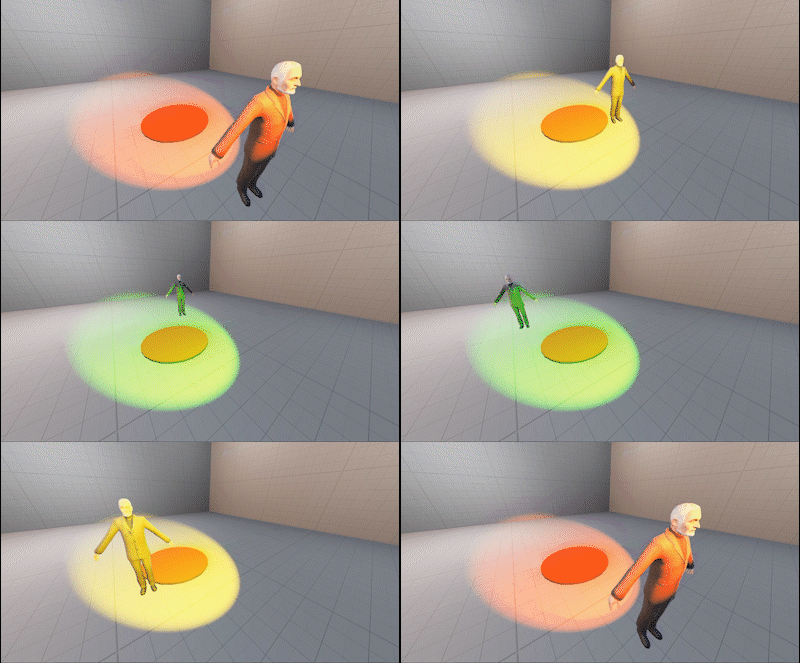](https://wiki.pragma-engine.com/uploads/images/gallery/2021-09/pfm-animation-driver-1.gif) - Making an actor always face the camera: ```Lua local camId = "6f964743-faa6-4b2b-b781-41a258e2f7d1" -- Id of the camera actor local expr = [[ local angToCamera = self:GetAngles(trCam) return EulerAngles(0,angToCamera.y,0) ]] actor:AddDriver( ents.COMPONENT_TRANSFORM,"angles", game.ValueDriverDescriptor(expr,{ -- 'trCam' variable referencing the transform component of the camera actor ["trCam"] = "pragma:game/entity/ec/transform?entity_uuid=" .. camId }) ) ``` [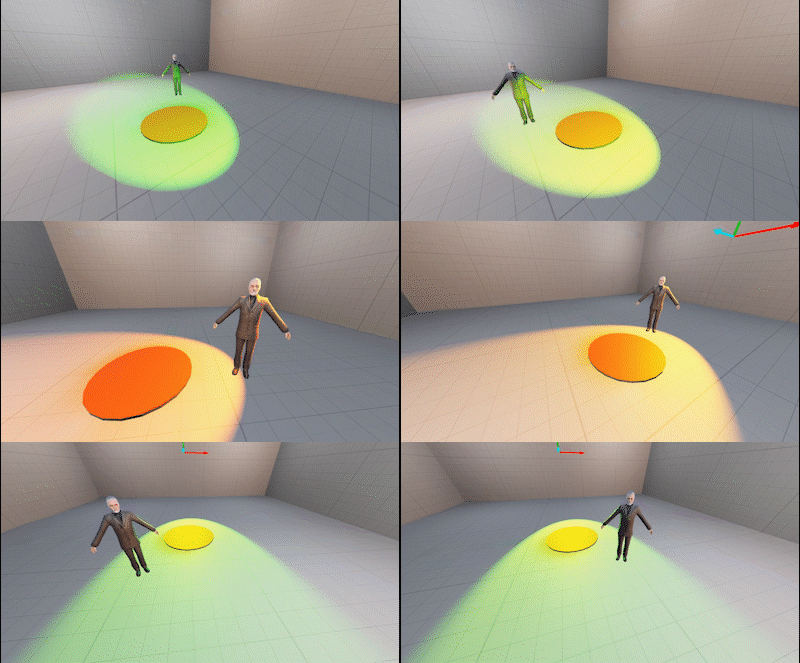](https://wiki.pragma-engine.com/uploads/images/gallery/2021-09/pfm-animation-driver-2.gif)